Anfahrt
Toppoint e.V.
Holzkoppelweg 20
24118 Kiel
Mit dem Fahrrad
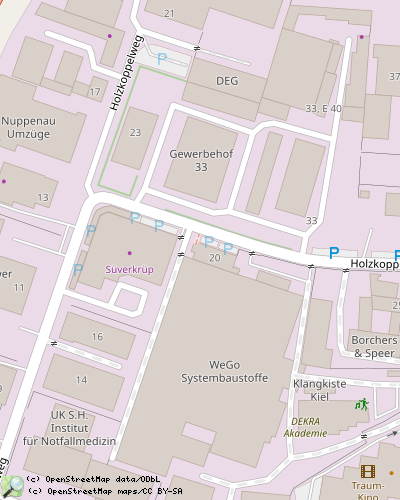
Der Holzkoppelweg 20 liegt ca 100m westlich von der Veloroute 10. Neben dem Haus soll es zukünftig einen Fahrradständer geben, aber dafür fehlt uns noch das Geld.
Zu Fuß
Von der Universität aus erreicht man über einen Fußweg Richtung Süden den Grasweg und biegt nach etwa 400m rechts ab in den Holzkoppelweg.
Öffentlicher Nahverkehr
Die Toppoint erreicht ihr mit den Buslinien 22 und 81 sowie 742/743 (aus Gettorf) Haltestelle Eichhofstraße in der Eckernförder Straße oder mit der 71, 72 Haltestelle Eckernförder Straße in der Eichhofstraße. Von dort sind es etwa 500m durch den Holzkoppelweg (der Rechtskurve folgen) zur Toppoint.
Parken
Mit dem Auto ist Parken vor dem Haus nur außerhalb der Geschäftszeiten problemlos möglich.
operating instructions
Various functions are available as part of the map.
mouse/touch operation
- moving by grabbing the map with a mouse-click you can move the map around
- overview map using the < button in the bottom right of the map you can expand an overview map
- zooming in and out using the + and - buttons in the top left of the map you can obtain more or less detail in the map
- switching themes or maps clicking on the ≡ icon on the right-hand side of the map you can view and select available maps and themes
- retrieving information the map may contain elements that contain more information, by clicking these a popup will show this information
- fullscreen display using the ⛶ button the map can be maximized to fullscreen display, use the ▢ button to return to page display.
keyboard operation
Keyboard operation becomes available after activating the map using the tab key (the map will show a focus indicator ring).
- moving using the arrow keys you can move the map
- overview map using the + button in the bottom right of the map you can expand an overview map
- zooming in and out using the + and - buttons in the top left of the map or by using the + and - keys you can obtain more or less detail in the map
- switching themes or maps clicking on the ≡ icon on the right-hand side of the map you can view and select available maps and themes
- retrieving information the map may contain elements that contain more information, using the i key you can activate a cursor that may be moved using the arrow keys, pressing the enter will execute an information retrieval. press the i or the escape key to return to navigation mode
- fullscreen display using the ⛶ button the map can be maximized to fullscreen display, use the ▢ button to return to page display.
It's possible that some of the functions or buttons describe above have been disabled by the page author or the administrator
| id | symbol | latitude | longitude | description |
|---|---|---|---|---|
| This map shows how to get to Toppoint e.V. | ||||